


– Improved design work environment by introducing real-time automatic saving and collaboration features that reflect user feedback.
– Usability upgrades with expanded design elements and text and audio editing capabilities
Positive reviews from the 3 -month open beta test… Proving user satisfaction.
Design platform company MiriD Co., Ltd. (CEO Kang Chang-seok) announced that its visual communication platform 'Miricanvas', operated by MiriD, is releasing Editor 2.0 with fully enhanced design functions.
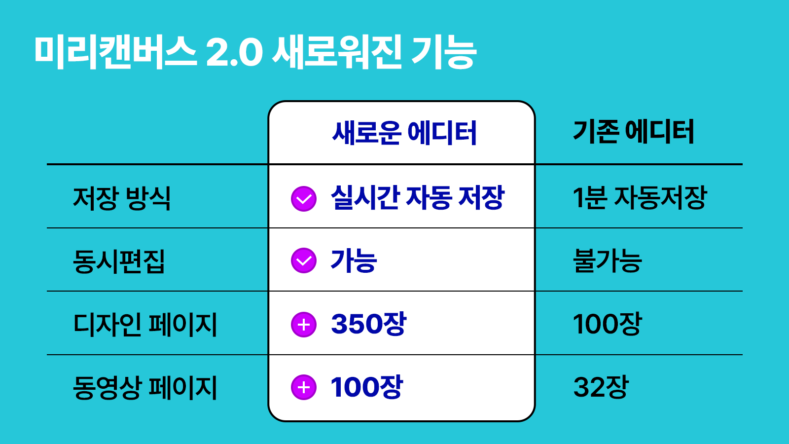
This official update, Editor 2.0, reflects actual user feedback and focuses on improving the convenience of the image editing process. It introduces a real-time auto-save feature, supports up to 350 design pages and 100 video pages per presentation, and enables collaboration and simultaneous editing for up to 50 people through workspace member invitations.
In addition, we have supplemented functions such as ▲ adding photo, video, and chart outlines ▲ rotating design elements in crop mode ▲ automatically aligning design element spacing and batch editing of length and color ▲ assigning text properties such as gradients, outlines, shadows, and animations ▲ inserting and editing audio such as BGM ▲ updating 10 new shortcut keys.
This frees users from the risk of losing work due to missed saves and the limited collaboration environment, enabling more stable and efficient design work. In fact, during the three-month open beta service, users received positive feedback for its functional improvements, including comments such as "auto-save keeps work safe," "simultaneous editing is great," and "excellent text design features like gradients." The service also achieved a Net Promoter Score (NPS) of 4.3 out of 5.
Miricanvas plans to strengthen its 'all-in-one design experience' by linking Editor 2.0 with its own image creation and editing AI tool 'MiriCle', allowing users to conveniently complete everything from image creation to final results using only Miricanvas.
A representative of Miricanvas said, “We have optimized the design workflow by expanding the functions of real-time automatic saving, simultaneous collaboration, and editing of design elements, text, and audio,” and “We will support even beginners to complete high-quality designs with intuitive operations.”
You must be logged in to post a comment.